Database Management Tool — v2.3.0
DBreeze is a desktop database manager for MySQL, MariaDB and PostgreSQL. Browse tables, write queries, manage schema objects and visualise ER diagrams — all in one window. Runs on macOS, Windows and Linux.
MySQL, MariaDB and PostgreSQL — the three most widely-used open-source relational databases.
5.7 and later
10.x and later
12 and later
Every feature listed here works in v2.3.0. Nothing is "coming soon."
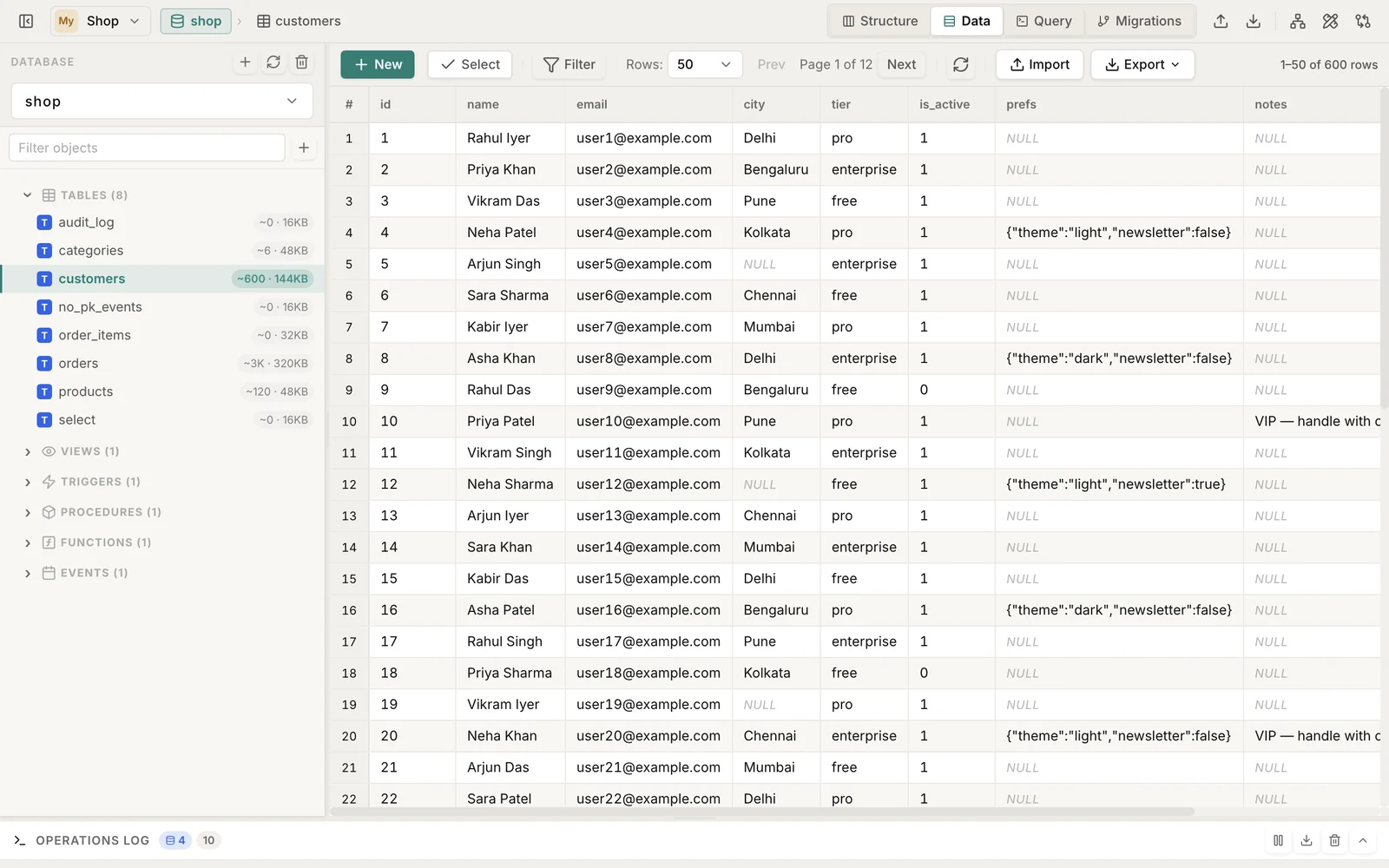
Browse rows, edit cells inline, sort by any column, paginate large tables. ENUM fields get a dropdown, dates get a picker, FK columns show a lookup so you don't need to remember IDs.
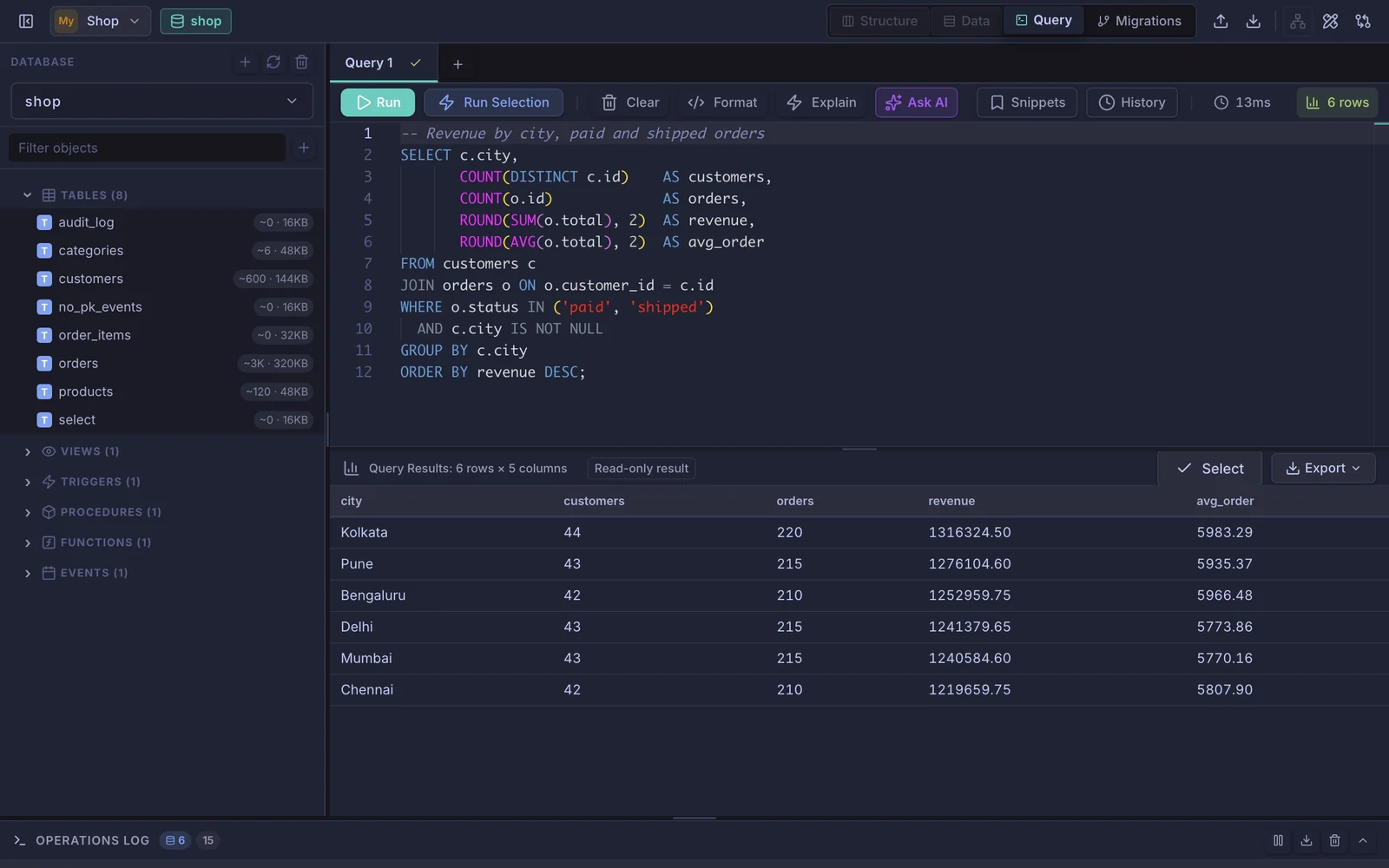
Monaco Editor — the same one in VS Code — with SQL syntax highlighting. Hit Ctrl+Enter to run. Multi-statement execution is supported, so you can paste a whole migration script and run it in one shot.
Auto-generated entity-relationship diagram for any database. Drag tables, zoom in, toggle the mini-map, then export to PNG, SVG or PDF. Relationship types (1:1, 1:N) are detected automatically.
When you change a column type that a foreign key references, DBreeze detects the conflict and offers to drop and recreate the FK automatically. You see the exact DDL before anything runs.
Deleting a row that other tables reference? DBreeze traces the full FK chain recursively, shows you what else will be deleted, and asks for confirmation before touching anything.
Build IF-THEN-ELSE trigger logic with a visual condition editor (MySQL). Add AND/OR connectors, nested blocks, DEFINER settings — no manual SQL needed. Switch to raw SQL view any time.
Create, view and drop views, triggers, stored procedures, functions and events. Source code is shown with proper SQL formatting. DEFINER and CHECK OPTION fields are supported where applicable.
Add, modify, rename and drop columns. Drag to reorder. All changes go through ALTER TABLE — nothing runs destructively without a preview of what's about to change.
Stack multiple filter conditions with operators like equals, contains, starts with, is null, >, <=. Filters combine with AND/OR — useful for narrowing large tables without writing WHERE clauses manually.
Export databases or individual tables as SQL dumps. Import SQL files. Integrates with mysqldump and pg_dump when available. Progress is shown in real time for large files.
View, create and drop foreign keys with ON DELETE / ON UPDATE actions. Create, modify and drop indexes with method selection (BTREE, HASH). All shown as forms — not raw DDL to type by hand.
Save as many connections as you need — local dev, staging, production. SSL is supported. A production-mode flag adds a visual warning so you don't run queries on the wrong database.
Three theme options that apply instantly without a page reload. System theme follows your OS preference automatically.
Pin frequently used tables to the top of the sidebar. Pinned state persists across sessions — no scrolling through long database lists every time you open the app.
Every query and DDL statement DBreeze runs is logged in a panel at the bottom. Useful for debugging exactly what happened during a session. Errors auto-dismiss after 5 seconds.
Design tables on a drag-and-drop canvas. Set columns, types, primary keys, NOT NULL and UNIQUE flags, then draw foreign keys between tables — or import your existing schema to link against it. Generated CREATE TABLE SQL updates live.
Compare the current database against any other saved connection. DBreeze lists every table, column, index and foreign-key difference, then generates the ALTER/CREATE/DROP statements to bring the target in sync.
Describe what you want in plain English and DBreeze writes the SQL using your live schema as context (powered by Claude). Review it in the editor before running — nothing executes automatically.
Run EXPLAIN on any query and see the plan rendered visually for MySQL and PostgreSQL. Full table scans, filesorts and temp-table warnings are flagged so you know where to add an index.
Import CSV or JSON files straight into a table with a column-mapping step. Rows are inserted in batches with progress shown, so large files load without freezing the UI.
Track schema changes as ordered, timestamped migrations with up and down SQL. Apply and roll back from inside the app, with a clear view of what has and hasn't been run on the current database.
Protect your account with TOTP-based two-factor authentication using any authenticator app. Adds a second layer of security on top of email and Google sign-in.
Every query you run is saved per connection, searchable and re-runnable. Save your go-to queries as named snippets and pull them back into the editor whenever you need them.
Illustrated walkthroughs of the surfaces you'll use most.
The main window — table tree on the left, inline-editable data grid on the right. Edit cells in place; types, ENUMs and foreign keys get smart inputs.
SQL editor powered by Monaco, plus AI generation — describe a query in plain English and get SQL back, ready to review.
ER diagrams generate themselves — drag to arrange, relationship types are detected, and you can export to PNG, SVG or PDF.
Visual Schema Designer — drag out tables, set keys and types, link foreign keys by drawing between them. The CREATE TABLE SQL writes itself.
EXPLAIN visualizer turns the query plan into a readable tree and flags full scans, filesorts and temp tables for MySQL and PostgreSQL.
Schema Diff & Sync compares two databases column-by-column and writes the exact SQL to bring the target in line.
Version 2.3.0 · 14-day free trial, no account needed to start.
macOS 10.13 or later · Apple Silicon & Intel
Download DMGUniversal Binary · ~124 MB
Also available on Mac App Store
Windows 10 or later · 64-bit
Download InstallerNSIS Installer · ~97 MB
Also available on Microsoft Store
Ubuntu, Debian, Fedora and others
Download AppImageAppImage · x86_64 · ~133 MB
Also available on Ubuntu Snap Store
Questions? Email atishpaul01@gmail.com
Start free for 14 days. No credit card required.
Most Popular
Save $10 — 2 months free
Subscriptions are managed inside the app after you create an account. Store versions (Mac App Store, Microsoft Store) use the store's own billing.